We’re pleased to announce that Infuse 8.4 is available today, bringing a host of powerful new features and improvements to iPhone, iPad, Apple TV, Mac, and Vision Pro.
This release introduces support for browsing and playing extras, community-powered skipping for intros and credits, home screen favorites on more devices, and a major upgrade to Infuse’s playback core. Together, these updates make enjoying your library in Infuse better than ever before!
Extras, deleted scenes, trailers, and more
Infuse 8.4 adds support for browsing and playing a variety of additional local content for movies and TV shows, including deleted scenes, featurettes, shorts, trailers, and more.
These extras can be pulled from Emby, Jellyfin, and Plex or from directly connected folders, network shares, and cloud services. When available, these extras will appear directly on the title’s details page, making it easy to discover and enjoy even more from your library without ever having to leave Infuse. Learn more about naming and organizing extras.

Skip intros, credits, and recaps
When binge-watching, nothing should get in the way of the story and now it’s now easy to skip intros, credits, recaps, and more.
This feature is powered by two new — but fast-growing — community-driven databases: IntroDB.app and TheIntroDB.org. Similar to TMDB, which Infuse uses for movie and TV metadata and artwork, these services rely on contributions from the community. Creating a free account and submitting timestamp data helps improve the experience for everyone.
Skip features are available for all share types and can be set to skip automatically or manually. Settings to adjust (or disable) these features can be found in Infuse > Settings > Playback.

Home screen favorites on every platform
Pinning favorites to the Infuse home screen is one of the easiest ways to keep your most-used folders and library categories close at hand. This has long been available on Apple TV, and now it’s available on iPhone, iPad, Mac, and Vision Pro as well.
The Favorites row is added by default and can be customized by choosing which favorites appear and where the row is placed on the home screen. Prefer a cleaner look? It can be hidden too.
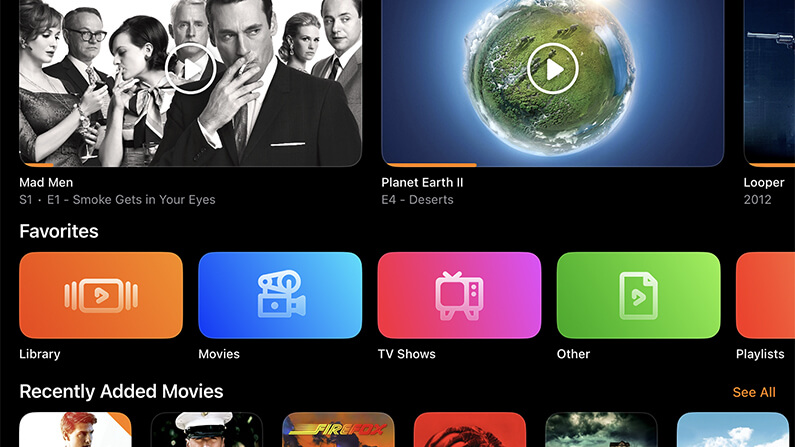
A supercharged playback core
At the heart of Infuse is a powerful playback engine built to handle just about any video file you throw at it. Today, that playback core receives a major upgrade with a wide range of improvements, fixes, and optimizations.
This update touches nearly every aspect of how Infuse accesses and plays video, resulting in an even better playback experience across the board. Also included is initial support for the relatively new VVC (H.266) codec, which is beginning to appear more frequently in the wild.
Note: VVC decoding is currently handled in software, so performance may vary depending on the device being used.

More improvements throughout
In addition to these major features, Infuse 8.4 includes a number of other enhancements, refinements, and fixes. Be sure to check out the full release notes for a complete look at everything that’s new in this update.
Thanks!
We always love hearing your comments, feedback, and suggestions, so please feel free to continue the conversation in our community forum.
Thanks so much for using Infuse! 🧡